
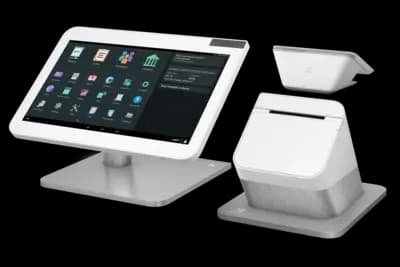

Clover Highlights
A liquor store POS is more than a cash register — it's your compliance partner, inventory system, and financial control center. While Clover is one of the most recognized POS brands in the U.S., liquor store owners must weigh simplicity against long-term flexibility.
Polished Interface
Clean, modern design with intuitive touchscreen navigation
App Marketplace
Hundreds of third-party apps for customization
Processor Lock-In
Tied exclusively to Fiserv/First Data processing
Cost Considerations
Monthly fees plus app subscriptions can add up over time
In this comprehensive review, we'll cover Clover's pricing, features, and limitations — and how it compares with liquor-specific systems like Korona, BottlePOS, and Lightspeed. We'll help you determine if Clover's ease of use outweighs its processor lock-in and whether it's the right fit for your liquor store.
Looking for a complete comparison? For a full breakdown of top-rated systems and their features, see our Best POS Systems for Liquor Stores guide.
Clover Key Takeaways
Clover's Top Features for Liquor Stores
Running a liquor store requires tight control over inventory, pricing, and age verification — areas where Clover delivers solid basics but not liquor-specific depth. Its built-in tools handle standard retail needs like stock counts and checkout speed, but advanced features such as case-break tracking or compliance reporting depend on third-party apps from the Clover Marketplace.
Inventory Management
Clover's built-in inventory tools cover the basics but stop short of the deep control most liquor stores need. Out of the box, Clover lets you:
- Add, edit, and categorize products by name, price, SKU, and category
- Track stock quantities and receive low-stock alerts when items reach preset thresholds
- Apply modifiers or variations (like different bottle sizes or pack counts) manually
- Import/export inventory data via CSV for quick setup or periodic updates
Clover lacks built-in case tracking and purchase ordering. Liquor stores typically add apps like Shopventory or Thrive for deeper inventory control for an additional monthly fee.
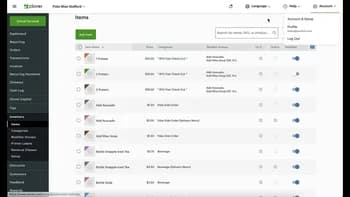
Robust Inventory management requires third-party apps
Age Verification & Compliance Features
Age verification through marketplace apps
Selling alcohol requires strict ID checks and accurate sales tracking. Clover includes basic tools but relies on apps for full compliance support:
- Manual age-check prompts — cashiers can confirm age at checkout, but Clover doesn't scan IDs by default
- Compliance & reporting add-ons — apps like Age Verification Pro or CustomerPlus automate ID scans and store logs for audits
These tools help liquor stores stay compliant and reduce liability during inspections.
Flexible Pricing & Promotions
Clover supports standard discounts and simple promotions but doesn't have liquor-specific pricing automation.
- Built-in discount tools — create mix-and-match deals or percentage discounts directly in Clover Dashboard
- Dual pricing options — available only through compatible apps or merchant-configured programs
Clover handles basic promos easily, but advanced pricing rules or automatic case discounts typically require third-party apps.
Built-in promotion tools
Multi-Channel Sales (In-Store + Online / Delivery / Pickup)
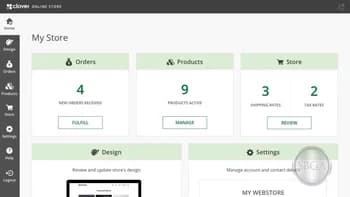
Online ordering capabilities
Clover offers basic online ordering through Clover Online and partner integrations but lacks dedicated liquor-delivery tools.
- Online store integration — syncs in-store inventory with an online menu via Clover Online or Shopventory
- Pickup & delivery options — can be added through apps like Bottlecapps or City Hive for alcohol-compliant delivery management
Clover works for simple online sales, but liquor-specific delivery and inventory syncing rely on third-party integrations.
Detailed Reporting & Analytics
Clover includes solid reporting for sales and inventory but limited liquor-specific analytics.
- Real-time dashboards — view sales, inventory, and employee data from any device
- Multi-location reporting — track performance across stores within the Clover Dashboard
- Advanced insights — deeper margin, vendor, or compliance reports require apps like Dashboard Pro or Shopventory
Clover's built-in reports work well for daily operations, but serious inventory or profit analysis needs marketplace add-ons.
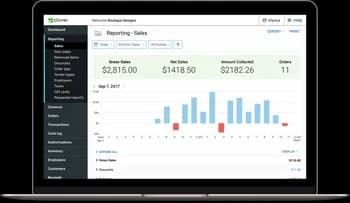
Cloud-based reporting dashboard
User-Friendly Interface & Reliable Checkout Speed
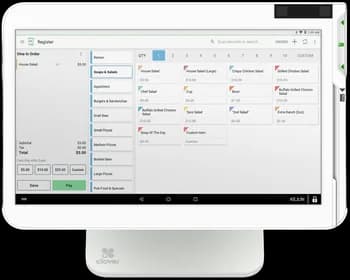
Intuitive touchscreen interface
Clover is known for its simple, polished design that makes training fast and checkout smooth.
- Intuitive touchscreen interface — clean layout that staff can learn in minutes
- Fast, reliable checkout — built for high-volume transactions with minimal lag
- Integrated hardware — barcode scanners, printers, and customer displays connect seamlessly
Clover's ease of use is one of its biggest strengths, especially for busy liquor stores with multiple cashiers.
Processor & Hardware Flexibility
Clover's biggest limitation is its processor lock-in — all hardware is tied to Fiserv (First Data).
- Processor exclusivity — you can't switch providers without replacing Clover equipment
- Hardware upgrades — only available through approved Clover resellers
- Hidden costs — additional fees often come from required apps and non-negotiable processing rates
Note: Liquor stores wanting long-term control over rates or hardware flexibility should consider open POS systems, such as Korona POS
No processor flexibility
Clover POS Pricing
Understanding Clover's true cost requires looking at software, hardware, and the marketplace add-ons most liquor stores need. Here's the complete breakdown.
Software Pricing
Standard Plan
Per terminal
- Simple inventory needs
- Basic employee management
- Best for small shops
Retail Growth Plan
Per location (annual billing)
- Advanced inventory tracking
- Detailed reporting & analytics
- Multi-location support
- Best for most liquor stores
Additional Terminals: Add $20/month per device after the first terminal.
Hardware Costs
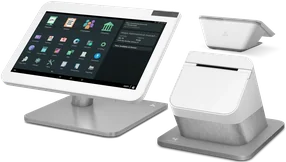
Clover Station Duo Bundle
Full POS station with customer-facing display, built-in printer, cash drawer and barcode scanner
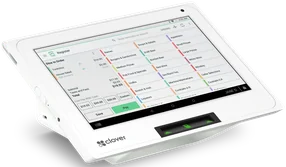
Clover Mini
Compact countertop terminal for smaller stores
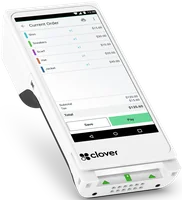
Clover Flex
Handheld mobile terminal (not ideal as primary POS)
Payment Processing Costs
- Processor locked to Fiserv
- Pricing controlled by reseller
- Limited ability to shop processing
- Common rates: 2.49% – 3.50%+
- True interchange pricing
- No % markup on sales
- Flat $49/month
- Transparent & auditable
Note: Clover devices are tied to the Fiserv ecosystem and generally cannot be reprogrammed to switch processors. In most cases, changing processors requires opening a new Clover account and installing new Clover hardware through the new provider.
Upload a recent merchant statement — we’ll quantify your savings in dollars.
Marketplace Add-Ons
For most liquor stores, the base software isn't enough on its own. To get all the features they actually need day-to-day, they usually end up adding several extra apps that come with additional costs.
Inventory Management
$29–$59 /mo
Stock, costs, suppliers
Age Verification
$5.99–$9.99 /mo
ID scanning & checks
Loyalty Programs
$0.15 /member
Or $69.99/mo for unlimited members
Compliance Reporting
$4.99–$9.99 /mo
State & local compliance
Payroll Management
$40–$100 /mo
Time & payroll processing
Multi-Location Inventory
$25–$75 /mo
Across multiple stores
Total Estimated Cost: $2,000 Hardware + $135–$200 monthly per location (software + essential apps)
Calculate Your Total Cost of Ownership
📌 Note: This calculator does not include Clover's marketplace add-on app costs, which typically add $40–$150/month for essential liquor store functionality.
Quickly Compare Clover to Korona, BottlePOS, Lightspeed, and Square
Pros and Cons of Clover POS for Liquor Stores
Every POS system comes with trade-offs. Here's how Clover stacks up for liquor store owners in 2026:
Pros of Clover POS
Polished Interface
Clover's software is clean, fast, and designed to feel intuitive for both new and experienced staff. The touchscreen interface uses large icons and simple navigation, making it easy to train employees and reducing checkout times.
Extensive App Marketplace
Clover's App Marketplace offers hundreds of third-party integrations, including accounting software, inventory management tools, and loyalty programs. This flexibility helps owners customize their setup for their exact needs.
Modern Hardware Design
Clover's hardware is sleek and functional, with a modern look that fits well in most retail settings. The Station Duo uses a dual-screen layout with a customer-facing display and built-in receipt printer, keeping the checkout area organized.
Cloud-Based Access and Reporting
Clover's cloud-based dashboard allows owners to log in from anywhere to view sales data, employee performance, or daily summaries. Reports load quickly, and real-time syncing means you can make pricing or inventory adjustments remotely.
Cons of Clover POS
Processor Lock-In
Clover systems are tied exclusively to Fiserv (First Data) for payment processing. This lock-in means you can't reprogram your hardware if you decide to switch to another provider or negotiate better rates — replacing hardware is the only way to change processors.
Limited Liquor-Specific Tools
Clover's core software lacks liquor-store-focused features like case-break tracking, bottle deposits, and automatic ID prompts. These functions can be added through third-party apps, but none are built in, making it feel more like a generic retail POS.
Higher Long-Term Costs
Because Clover hardware is locked to Fiserv, store owners can't move their accounts if rates increase — and they usually do. As processing fees rise and app subscriptions stack up, long-term costs often end up higher than with an open POS system.
Costly Add-Ons for Full Functionality
Many essential liquor-store features — such as deposit tracking, compliance reporting, or advanced inventory management — rely on paid apps from the Clover Marketplace. Each add-on increases monthly fees, making the system surprisingly expensive over time.
Key Takeaway: Clover's main drawbacks center around processor lock-in and incremental costs. While it delivers a smooth, modern experience, store owners looking for deep liquor-store functionality or processing flexibility should consider open systems like Korona or BottlePOS for better control and scalability.
Clover App Marketplace for Liquor Stores
One of Clover's biggest advantages — and challenges — is its App Marketplace. Unlike systems that include most liquor-store tools by default, Clover relies heavily on third-party apps to fill in gaps for inventory, compliance, loyalty, and analytics.
The benefit is flexibility: you can customize Clover to fit your exact workflow. The drawback is cost — each add-on has its own subscription fee, and quality varies between developers. Below are the most popular and useful add-ons liquor store owners typically install to make Clover work for their business.
Smart Inventory Management
Track stock levels, costs, and supplier orders

Thrive by Shopventory
Comprehensive inventory with supplier management

Yellow Dog Inventory
Affordable bottle-level tracking solution
Age Verification and ID Scan
Automated ID scanning and verification

CustomerPlus
Barcode scanning with age verification and expired ID detection
Loyalty Programs and CRM
Customer tracking and rewards programs

Clover Rewards
Basic loyalty program included with software plans

Trezoro
Advanced marketing with text offers and digital punch cards

LoyalZoo
Per-customer pricing for flexible loyalty management
Lottery & Compliance Reporting
State and local compliance tracking

Redeem Lottery
Lottery ticket tracking and validation

Payouts
Bottle deposit and tax-exempt item tracking
Employee Tracking and Payroll
Time tracking and payroll management

Time Clock
Simple clock-in/clock-out for tracking employee hours

Payroll by Gusto
Payroll processing and tax filings (separate Gusto fees apply)
Cloud Reporting and Multi-Store Management
Centralized reporting across all locations

Mission Control
Real-time dashboards and analytics for all locations
Thrive
Inventory and reporting for up to 2 locations (higher fees for 3+)
How Clover Compares to Other Liquor Store POS Systems
| Feature |  |  |  |  |  |
|---|---|---|---|---|---|
| Processor Choice | Locked (Fiserv) | Open | Locked to Square | $400/mo fee | Locked |
| Built-in Liquor Features | Requires apps | Yes | No | Yes | Yes |
| Case-Break Tracking | App needed | Built-in | No | Built-in | Built-in |
| Age Verification | App needed | Built-in | No | Built-in | Built-in |
| Monthly Software Cost | $84.95+ | $59–$69 | $49 (Retail Plus) | $109+ | $99+ |
| Hardware Cost | $1,299–$1,799 | $1,500–$2,5009 | $1,000–$1,200 | $1,400–$2,000 | $800–$1,500 |
| Best For | Ease of use & design | Compliance & flexibility | Startups & small shops | Multi-channel retail | Liquor specialists |
Takeaway:Clover is polished but inflexible. Liquor stores wanting lower fees or processor freedom are better served by open systems like Korona.
Reputation and User Reviews
Clover gets consistent praise for its clean hardware, fast setup, and easy-to-use interface, and liquor store owners often say staff can learn it quickly — but overall customer sentiment is mixed. While many like the day-to-day usability, a lot of reviews mention frustration with being locked into specific processors, needing to buy multiple apps to get full liquor-store functionality, and costs creeping up over time.
This shows up clearly in ratings: some platforms score Clover as low as 2.3/5, while others are closer to 3.8/5 — meaning the experience varies heavily depending on your business needs and processing agreement.

Users frequently highlight:
- Ease of Use — intuitive interface with minimal training required
- Modern Hardware — sleek design that enhances customer checkout experience
- Quick Setup — fast deployment and onboarding process
Most Common Complaint: Merchants frequently cite rising processing fees and lack of pricing transparency after the first year. Because Clover systems are tied to Fiserv, owners can't switch providers if rates change. Others mention the ongoing cost of third-party apps needed to make Clover fully functional for liquor stores, which increases long-term expenses beyond the advertised software plan.
While Clover delivers on ease of use and aesthetics, its processor lock-in and reliance on paid apps make it a more expensive long-term option for liquor stores seeking flexibility and lower processing costs.
Final Verdict: Is Clover Worth It for Liquor Stores?
Clover delivers a clean, modern POS experience that's perfect for owners who value ease of use and aesthetics over deep control. However, its processor lock-in and lack of built-in liquor tools make it a less flexible choice for long-term savings.
If you want simplicity and don't plan to switch processors, Clover is reliable.
If you want lower fees, compliance tools, and total ownership, systems like Korona or BottlePOS are better fits.
Not Sure Which System is Right for You?
Schedule a consultation with our POS experts and get personalized recommendations for your liquor store.
FAQs
Can Clover handle liquor store compliance?
Partially. You can configure ID prompts, but case-breaks and deposits require apps.
Is Clover's processing negotiable?
Kind of. You can choose any processing using the FiServ platform (which is most processors) and negotiate rates before signing up. However, once the Clover is programmed, it cannot be reprogrammed. It is important to negotiate rates and contract terms beforehand. Pay special attention to the processors ability to increase your fees over time.
Can I reprogram Clover hardware for Synapse?
No. Clover systems are unable to be reprogrammed. A new Clover staion will be needed.
Does Clover support multi-location liquor chains?
Yes, but extra fees per terminal make scaling expensive.
Is Clover a good choice for small liquor stores?
Yes — if you prioritize ease and design over processing flexibility.