
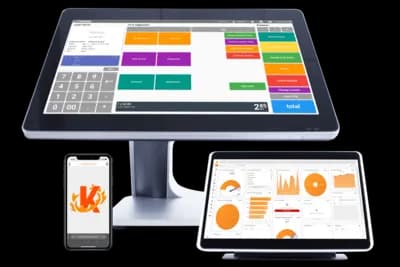

Why Korona POS for Liquor Stores?
Running a liquor store comes with unique challenges compared to other retail. You're responsible for strict compliance, high SKU counts, razor-thin margins, and customer expectations for fast checkout and loyalty perks.
Compliance First
Age verification, bottle deposits, and regulatory reporting built-in
Smart Inventory
Case breaks, mix-and-match pricing, and automated reordering
Processor Flexibility
Choose your own processor and switch anytime without hardware lock-in
Cost Control
Transparent pricing and lower processing fees save thousands annually
That's where Korona POS stands out. Built specifically with liquor workflows in mind, it offers compliance-focused tools, processor flexibility, and transparent pricing. In this comprehensive review, we'll break down Korona's features, real-world costs, and how it compares to competitors like Clover, Square, Lightspeed, and BottlePOS.
Looking for a complete comparison? For a full breakdown of top-rated systems and their features, see our Best POS Systems for Liquor Stores guide.
Korona Key Takeaways
Korona's Top Features for Liquor Stores
Smart Inventory Management
Liquor stores deal with thousands of SKUs, often with multiple formats (cases, six-packs, singles). Korona simplifies this with tools that track case breaks, bottle deposits, and mix-and-match discounts — all while keeping your cost accounting accurate. Features include:
- Case Break Tracking — automatically adjust stock and cost when a case is split into singles
- Mix-and-Match Discounts — run promotions like "Mix 6 bottles of wine, get 10% off"
- Bottle Deposit Tracking — automatically apply deposit fees in states where required
- Automated Reordering — receive alerts when stock runs low, ensuring shelves stay full during peak demand
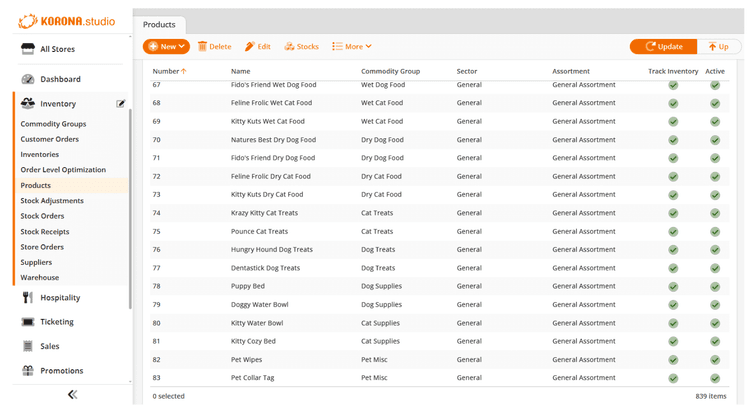
Inventory management dashboard
Compliance protection built-in
Built-In Age Verification Tools
Every liquor sale comes with compliance risk. Korona minimizes liability by automatically prompting ID checks for every age-restricted item. No transaction can proceed until the prompt is cleared, ensuring clerks never forget. That consistency protects your liquor license, reduces fines, and creates peace of mind for owners.
Loyalty Programs and CRM
Customer retention is just as important as acquisition. Korona includes a built-in CRM and loyalty engine that lets stores:
- Award points for purchases
- Offer personalized promotions
- Redeem rewards seamlessly at checkout
The result: higher visit frequency, larger basket sizes, and repeat customers who prefer your store over competitors.
Built-in customer retention tools
Simplified audits & reconciliation
Lottery & Compliance Reporting
For stores that sell both alcohol and lottery tickets, reconciling transactions can be tedious and error-prone. Korona integrates lottery sales into the same POS workflow, generating accurate compliance reports automatically. This reduces human error, simplifies audits, and helps you stay in good standing with regulators.
Cloud-Based Access
Korona is fully cloud-based, giving owners and managers remote visibility into sales, inventory, and staff activity. For multi-store operations, this means consistent pricing and real-time reporting across every location without the need to be onsite.
Real-time remote monitoring
Korona POS Pricing
When evaluating Korona's costs, you need to account for both software and hardware. Unlike bundled or locked systems, Korona is upfront with its pricing and doesn't bury you in hidden fees.
Software Pricing
Korona Core Plan
Best for small to mid-sized liquor stores
- Unlimited users (no per-seat fees)
- API access
- KPI dashboards
- eCommerce integration tools
Korona Retail Plan
Designed for stores needing advanced features
- Advanced inventory controls
- Promotions engine
- Employee permissions
- Multi-location support
Hardware Pricing
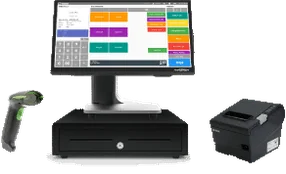
Partner Tech A5 POS Station
Integrated countertop system combining a touchscreen terminal, barcode scanner, and receipt printer.
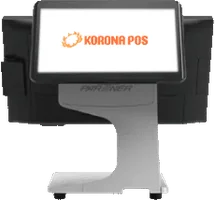
Customer-Facing Display
Secondary screen showing scanned items, totals, tax amounts, and loyalty activity in real time.
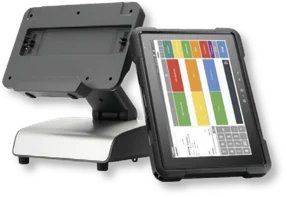
Handheld Mobile POS
Portable device designed for assisted sales, quick inventory checks, and mobile checkout.
Important: Total hardware spend scales with the number of checkout lanes. Most liquor stores budget hardware on a per-register basis when estimating startup costs.
Payment Processing Costs
Korona does not process payments or lock you into a provider.
Avoid blended pricing like 2.6% + 10¢ on every transaction.
Korona doesn’t take a cut of your processing volume.
With Synapse: interchange + $49/month. Typical savings of $500–$2,500/month for higher-volume stores.
Upload a recent merchant statement — we’ll quantify your savings in dollars.
Calculate Your Total Cost of Ownership
Quickly Compare Clover to Korona, BottlePOS, Lightspeed, and Square
Pros and Cons of Korona POS for Liquor Stores
Every POS system comes with trade-offs. Here's how Korona stacks up for liquor store owners in 2026:
Pros of Korona POS
Processor Flexibility (No Lock-In)
Unlike bundled systems like Clover or Square, Korona lets stores choose their own merchant services provider. This flexibility enables interchange-plus pricing, often saving high-volume liquor stores thousands each year in processing fees.
Liquor-Specific Compliance Tools
Built-in age verification prompts, bottle deposit tracking, and lottery reporting reduce compliance risks. These features are essential in a highly regulated industry and prevent costly errors or fines.
Affordable, Transparent Pricing
Starting at $59/month, Korona's pricing is competitive and predictable. There are no per-user fees, making it cost-effective for stores with multiple clerks or registers.
Cloud-Based Access and Reporting
Managers can log in from anywhere to monitor sales, inventory, and staff performance in real time. This visibility is especially valuable for multi-store operators.
Scalability for Growth
Korona scales smoothly from single shops to multi-location chains. Centralized reporting and management tools make it easy to roll out pricing, promotions, and inventory controls across locations.
Cons of Korona POS
Higher Upfront Hardware Cost
Starter bundles begin at $2,799 — more expensive than iPad-based alternatives. However, Korona's hardware is commercial-grade, durable, and often pays for itself through processing savings.
Learning Curve for Advanced Features
While day-to-day tasks are intuitive, advanced inventory and reporting tools require more setup and training. Owners should budget time for onboarding.
Lower Brand Recognition
Korona doesn't have the mainstream name recognition of Square or Clover. Some new users may hesitate at first, but strong user reviews and high ratings (4.6–4.7/5 across platforms) continue to build trust in the liquor retail space.
How Korona Compares to Other Liquor Store POS Systems
| Feature |  |  |  |  |  |
|---|---|---|---|---|---|
| Processor Flexibility | Open | Locked to Fiserv | Locked to Square | $400/mo fee | Locked |
| Built-in Liquor Features | Yes | Requires apps | No | Yes | Yes |
| Case-Break Tracking | Built-in | App needed | No | Built-in | Built-in |
| Age Verification | Built-in | App needed | No | Built-in | Built-in |
| Monthly Software Cost | $59–$69 | $84.95+ | $49 (Retail Plus) | $109+ | $99+ |
| Hardware Cost | $1,500–$2,500 | $1,299–$1,799 | $1,000–$1,200 | $1,400–$2,000 | $800–$1,500 |
| Best For | Compliance & flexibility | Ease of use & design | Startups & small shops | Multi-channel retail | Liquor specialists |
Takeaway: Korona combines liquor-specific tools with processor flexibility, making it the top choice for stores that want both compliance features and control over their payment processing costs.
Reputation Built on Reliability and Support
While Korona doesn't yet have the same name recognition as Square or Clover, its reputation in liquor retail is steadily rising. By focusing on niche industries like liquor, convenience, and specialty retail, Korona has developed features that directly address compliance, inventory, and sales challenges most competitors overlook.
Customer feedback reflects this focus:

Users frequently highlight:
- Ease of Use — intuitive workflows and a short learning curve
- Responsive Support — knowledgeable staff that resolve issues quickly
- Open Pricing — no hidden fees or forced add-ons, creating long-term trust
Most Common Complaint: Some users note that advanced features like detailed reporting and inventory management have a learning curve and may require additional training time for staff to fully utilize.
With consistently strong ratings and endorsements from both users and industry experts, Korona has proven that the best liquor store POS isn't always the biggest brand name — it's the one that delivers reliability, compliance, and value over the long term.
Final Verdict: Is Korona the Best Liquor Store POS in 2026?
Korona is one of the strongest liquor store POS systems in 2026—especially for processor flexibility, compliance workflows, and transparent pricing versus bundled platforms like Clover, Lightspeed, and BottlePOS.
Why Korona Wins
- Processor flexibility for long-term savings
- Liquor-specific compliance controls
- Scales cleanly from single store to multi-location
Tradeoffs to Know
- Upfront hardware can feel expensive
- iPad-first simplicity may feel more familiar on Square/Clover
- Lightspeed may fit better if advanced eCommerce is priority
Best For
- Liquor stores processing $50,000+ monthly in card sales
- Single stores or multi-location chains that want scalability
- Owners who value processor flexibility and compliance tools
- Stores tired of paying high flat-rate processing fees
The higher upfront hardware cost can feel steep, but the system often pays for itself through lower processing fees and fewer compliance headaches. For liquor retailers who want an industry-built platform—including case-break tracking, bottle deposit management, and lottery reporting— Korona remains a balanced, cost-effective, and future-ready choice.
Ready to See How Much You Can Save?
Schedule a demo and see how Korona + Synapse can reduce your processing costs by thousands annually.
FAQs
Why should I choose a POS with processor flexibility?
This is what gives your business leverage. When not locked into a single provider, you can shop around for the best rates, negotiate lower fees, and switch if costs rise. Over the lifetime of your system, this type of freedom saves more than the software itself costs.
Is Korona cheaper than Clover, Square, or Lightspeed?
Yes — especially for stores processing higher volumes. While Korona's upfront hardware cost is higher, its monthly software is less expensive and processor flexibility enables lower effective rates. Over a year, Korona can save thousands compared to flat-rate systems.
Does Korona work for multi-location liquor stores?
Absolutely. Korona was built to scale. You can manage pricing, inventory, and staff across multiple stores from a single dashboard, without extra per-user fees. This makes it one of the most cost-effective options for growing chains.
What's the biggest drawback of Korona?
The upfront hardware cost ($2,799+) is higher than iPad-based systems, and advanced reporting tools may require more staff training. However, the investment usually pays off within the first year through processing savings and compliance protection.
Is Korona good for small, single-store operators?
Yes. The Core plan ($59/month) is designed for single-location stores that want liquor-specific tools without overspending. You still get compliance features, case-break tracking, and processor flexibility, which are critical even for smaller shops.