
Korona vs Clover: Key Differences for Liquor Stores
Korona and Clover can both run a liquor store — but they’re built around very different priorities. Clover is a popular “all-in-one” system with strong hardware and an app marketplace, while Korona is built for inventory-heavy retail, deeper reporting, and flexible processing. Below are the differences that matter most to liquor store owners before choosing between them.
Liquor Inventory Depth
Korona supports case-breaks, multi-unit tracking, vendors, and purchase orders. Clover can handle basics, but advanced liquor workflows often rely on add-ons with additional costs.
Processing Flexibility
Clover is commonly sold with processor lock-in through a reseller/ISO. Korona is processor-agnostic, so stores can shop rates and avoid long-term payment constraints.
Built-In vs App-Driven
Clover’s flexibility often comes from its app marketplace. Korona includes more inventory and reporting depth natively, which can reduce add-on dependency and overall cost.
Scalability & Control
Clover is a strong fit for many small retail setups. Korona is typically better for higher-SKU, higher-volume, or multi-location liquor stores needing tighter control.
Korona Wins For
- High-SKU liquor stores
- Case-break inventory workflows
- Owners who want processor choice
- Multi-location or growing operations
Clover Wins For
- Owners who want an all-in-one POS + hardware bundle
- Small liquor shops with simpler inventory needs
- Teams prioritizing ease of rollout and familiar UI
In the sections below, we’ll break down Korona vs Clover across pricing, hardware, inventory workflows, processing costs, and real-world fit — so you can choose the system that matches how your liquor store operates today (and how you plan to grow).
Want more context?
See where both systems rank in our Best POS Systems for Liquor Stores guide — or dive deeper into our full reviews: Korona POS and Clover POS.
Korona vs Clover: Key Takeaways for Liquor Stores
Korona vs Clover: Core Features That Matter for Liquor Stores
Korona and Clover can both power a liquor store, but they’re optimized for different priorities. Clover is known for its all-in-one hardware ecosystem and broad retail usability, while Korona is built for inventory-heavy liquor operations that need tighter controls, deeper reporting, and more flexibility as the business scales.
Inventory & SKU Management
 Korona
Liquor Inventory Edge- Case/pack/bottle tracking with case-break workflows
- Vendors + purchase orders to manage reorders at scale
- High-SKU friendly structure for liquor catalogs
- Reporting depth that helps spot shrink & margin issues
 Clover
Good for Basic–Mid Inventory- Easy SKU setup with a familiar retail interface
- Case-break inventory handled via add-ons such as "Thrive Inventory" for a monthly fee.
- Purchasing + vendor tools depend on apps/integrations for addional fees
- Strong hardware ecosystem for front-counter speed
Payment Processing & Long-Term Cost Control
Korona
Cost Control Edge- Processor-agnostic (not locked to one rate plan)
- Supports interchange-plus and cost-plus structures
- Negotiation leverage as ticket size and volume increase
- Easier to audit fees and keep statements honest
Clover
Often Processor-Locked- Sold with processor lock-in and cannot be reprogrammed to another processor
- Simple “bundle” buying experience for software + hardware
- Less flexibility to renegotiate processing as volume grows
- Total cost can drift when apps/add-ons are layered in
Simplicity & Ease of Use
Korona
More Setup- More initial configuration for inventory, roles, and workflows
- Training takes longer than plug-and-play retail POS
- Pays off for inventory-heavy liquor operations
- Better long-term fit when complexity is real
Clover
Simplicity Edge- Quick to learn for most owners and staff
- Smooth onboarding when hardware + software are bundled
- Retail-friendly UI that feels familiar day one
- Strong for small teams that want fast adoption
Age Verification & Compliance
Korona
Compliance Edge- Age-restricted item prompts tied to specific SKUs, with native ID scanning support
- Cashier-level permissions and override tracking
- Audit-friendly reporting for voids, refunds, and exceptions
- Designed for liquor workflows, not generic retail
Clover
Basic Coverage- Age prompts can be configured for restricted items (ID scanning requires third-party apps)
- Control depth varies based on configuration and installed apps
- Audit detail may be lighter than liquor-first systems
- Fine for straightforward stores with consistent staff practices
Operational Control & Back-Office Management
Korona
Control Edge- Granular user permissions by role and responsibility
- Inventory rules and safeguards to reduce shrink and errors
- Vendor, purchasing, and receiving workflows
- Audit-friendly reporting for compliance and reconciliation
Clover
Moderate Controls- Role-based access for common staff permissions
- Advanced safeguards may vary by configuration or add-ons
- Purchasing workflows often depend on apps/integrations at additional cost
- Good day-to-day reporting for straightforward operations
Scalability & Long-Term Growth
Korona
Growth-Ready- Multi-location inventory management
- Centralized purchasing and vendor controls
- Consistent reporting across locations
- Handles high SKU counts without workarounds
Clover
Scales — With Planning- Can support multiple registers/locations (varies by setup)
- Inventory workflows may get complex as SKU count grows
- Reporting consistency can vary across locations and apps
- Add-ons may be needed as operations become more advanced
For most liquor stores, Korona is the stronger overall system due to its inventory depth, processing flexibility, compliance controls, and ability to scale cleanly as operations grow. Clover is a solid option for stores that want an all-in-one POS and hardware bundle with a familiar retail experience — but owners should confirm inventory workflows, reporting needs, and processing terms before committing long-term.
Schedule a live demo to walk through inventory, compliance, pricing, and day-to-day workflows — and compare both systems side by side.
Korona vs Clover Pricing
Pricing for both Korona and Clover varies by store size, hardware configuration, and payment processing setup. Neither platform publishes fixed, all-inclusive pricing. Below are realistic cost ranges and what most liquor stores can expect.
Software & Platform Fees

- Case / pack / bottle conversions
- Vendor, purchase order, and cost tracking
- Advanced reporting and controls included

- Simple monthly software pricing
- Key liquor features require paid add-ons
- Total cost rises with inventory complexity
Hardware Costs
Both systems offer modular hardware options — registers, receipt printers, scanners, and PIN pads. Hardware costs depend on whether you purchase outright or bundle through a provider.
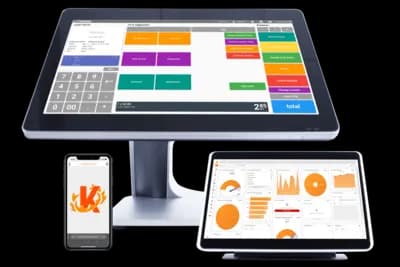
Korona Hardware
Korona typically uses full-featured retail components — touchscreen terminal, barcode scanner, receipt printer, and cash drawer. Upfront costs are higher, but hardware is processor-agnostic and built for long-term flexibility.
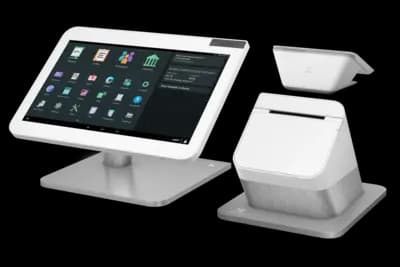
Clover Hardware
Clover hardware is more affordable upfront and designed as an all-in-one system. Devices are proprietary and closely tied to Clover’s ecosystem and processing arrangements, which can affect flexibility over time.
Payment Processing Costs
Payment processing is often the largest long-term expense — and this is where Korona and Clover differ the most.

Korona is processor-agnostic, allowing liquor stores to bring their own processor or work with approved acquiring banks and gateways.
Synapse pricing:
Interchange (hard cost) + $49/month
No percentage markup on transactions
This structure is designed to scale efficiently as volume increases, avoiding compounding percentage markups.

Clover processing terms depend on the reseller and contract structure tied to the POS hardware bundle.
Typical structure:
Interchange + ~0.30% (30 basis points)
May include additional monthly or per-device fees
Rates and flexibility vary widely by provider. Liquor stores should review processing agreements carefully, especially as volume grows.
Takeaway: With Korona, liquor stores can pair open processing with Synapse’s $49/month + interchange pricing to reduce long-term costs. Clover’s bundled, reseller-driven processing can be convenient upfront, but often becomes more expensive as transaction volume and operational complexity increase.
Calculate Your Total Cost of Ownership
📌 Note: This calculator does not include Clover's marketplace add-on app costs, which typically add $40–$150/month for essential liquor store functionality.
Quickly Compare Clover to Korona, BottlePOS, Lightspeed, and Square
Key Advantages for Liquor Stores: Korona vs Clover
Korona and Clover are built with different priorities in mind. Clover emphasizes bundled hardware, fast deployment, and an app-driven ecosystem, while Korona focuses on inventory depth, operational control, and long-term flexibility. Here are the core advantages liquor stores typically see with each platform:
Korona POS Advantages
- Retail-grade inventory built for high-SKU liquor stores
- Native case / pack / single unit conversions
- Processor-agnostic — full control over payment processing
- Stronger purchasing, vendor cost tracking, and reporting
- Scales better as volume, locations, and complexity increase
Clover POS Advantages
- All-in-one hardware options with sleek countertop designs
- Fast setup with a familiar, cashier-friendly interface
- Large App Marketplace for added functionality (paid add-ons)
- Good fit for small liquor stores prioritizing ease over depth
Summary: Clover works well for liquor stores that want bundled hardware and a quick, app-driven setup. Korona is the stronger choice for stores that care about inventory precision, reporting depth, and long-term control.
How Korona and Clover Compare for Liquor Stores
| Category |  |  |
|---|---|---|
| Inventory Depth (High-SKU Liquor) | Advanced | Moderate (often app-dependent) |
| Case / Pack / Single Conversions | Built-in | Requires paid apps |
| Ordering, Vendors & Cost Tracking | Strong back office | App-based add-ons |
| Age & ID Compliance Workflows | Robust prompts & controls | Basic prompts (varies by app) |
| Reporting & Operational Control | Deeper reporting + permissions | Solid, but limited without apps |
| Processor Choice | Processor-agnostic | Locked to Processor |
| Omnichannel / Online | Via integrations | Strong app ecosystem and online shop |
| Typical Cost Trend Over Time | More controllable long-term | App fees + processing can stack |
| Best Fit | Higher-SKU stores needing precision & control | Smaller liquor stores prioritizing bundled hardware |


Takeaway: Clover is a strong option if you want bundled hardware and a fast, app-driven setup — but many liquor-specific workflows (inventory depth, purchasing, and reporting) often rely on paid add-ons, and processing is typically locked to Clover. Korona is usually the better long-term fit for higher-SKU liquor stores that want deeper retail controls and full processor flexibility.
Korona vs Clover: Reputation and User Reviews

Korona
Clover POS
Final Verdict: Korona vs Clover for Liquor Stores
Korona and Clover succeed for very different reasons. Clover focuses on bundled hardware and fast, app-driven deployment, while Korona is built for liquor retailers that need deeper inventory control, stronger reporting, and long-term operational flexibility.
Many liquor stores start with Clover for its convenience, then reconsider as inventory, reporting, and cost-control needs become more complex.
Bottom line:
- If you want bundled hardware, fast setup, and an app-based ecosystem → Clover POS can be a good starting point.
- If inventory depth, reporting precision, and long-term processing flexibility matter more → Korona POS is usually the stronger fit.
Still Deciding Between Korona and Clover?
Talk with our POS specialists — we’ll compare Korona, Clover, and other liquor-store-ready systems based on your SKU count, volume, and growth plans.
FAQs: Korona vs Clover
Do Korona and Clover support liquor-store compliance?
Yes — both systems support liquor-store compliance, but in different ways. Korona offers configurable age verification, permissions, and inventory controls that scale well as SKU counts grow. Clover supports age prompts and restrictions, but more advanced compliance workflows often depend on paid apps.
Do I have to use Korona or Clover for payment processing?
Clover is typically tied to its processing ecosystem, meaning most merchants are required to use the processor provided through their Clover reseller. Korona is processor-agnostic, allowing you to choose, negotiate, and change payment processors over time.
Which system is cheaper for liquor stores?
Clover can appear cheaper upfront, especially when bundled with hardware, but many liquor stores add paid apps for inventory, reporting, and purchasing. Processing costs are also less flexible due to processor lock-in. Korona often has higher upfront hardware cost, but its support for interchange-plus pricing and processor choice can lead to lower total costs over time for higher-volume liquor stores.
Which POS is better for large liquor inventories?
Korona is generally the better option for liquor stores with large or complex inventories. Reviews frequently cite stronger reporting, better vendor cost tracking, and tighter inventory controls. Clover can work for smaller catalogs but often relies on apps as inventory needs grow.
Is Clover or Korona better for small, single-location liquor stores?
Clover is often a good fit for small, single-location liquor stores that want bundled hardware and a familiar checkout experience. Korona can also work for smaller stores, but it’s typically chosen by owners who want more control or plan to scale without switching systems later.
Which POS is better if I plan to grow?
If growth is part of your plan, Korona is usually the stronger long-term choice. Its inventory depth, reporting precision, and processor flexibility make it easier to scale without running into platform limitations. Clover works best when operational complexity remains relatively low.