
Clover vs Lightspeed, Key Differences for Liquor Stores
Clover and Lightspeed both serve liquor retailers, but they are built with different priorities. Lightspeed is a retail-first platform focused on inventory depth, reporting, and scale. Clover is a payments-first system with lower upfront cost and processor choice at signup, though its hardware is not reprogrammable. These differences matter more as inventory complexity and store volume grows.
Inventory Depth
Lightspeed offers stronger inventory structure, purchasing data, and margin reporting for high-SKU and multi-location liquor stores.
Retail Workflows
Lightspeed handles variants, purchasing, and catalog organization more natively. Clover can support these workflows, but often relies on apps and configuration.
Payment Processing
Clover allows processor choice at signup, Lightspeed encourages bundled payments and reportedly charges about $400 per month for outside processing.
Cost Over Time
Lightspeed delivers more advanced tools, but at a higher monthly cost. Clover is typically more affordable, especially for smaller or single-location stores.
Clover Is Usually the Better Fit If
- You want lower upfront and ongoing costs
- You value processor choice and payment flexibility
- You prefer faster setup with simpler operations
Lightspeed Is Often the Better Fit If
- You prioritize inventory depth and reporting
- You manage large SKU counts or multiple locations
- You are willing to pay more for a retail-first platform
Below, we break down Clover and Lightspeed in more detail, including pricing, hardware, inventory structure, processing costs, and real-world fit, so you can choose the system that aligns with how your liquor store operates today and how you plan to grow.
Want more context?
See where both systems rank in our Best POS Systems for Liquor Stores guide, or read the full reviews: Clover POS and Lightspeed POS.
Clover vs Lightspeed, Key Takeaways for Liquor Stores
Clover vs Lightspeed, Core Features That Matter for Liquor Stores
Clover and Lightspeed are both viable for liquor retailers, but they win for different reasons. Lightspeed is a retail-first platform that stands out for inventory depth, purchasing, and reporting. Clover is a payments-first system that is typically cheaper to start, offers processor choice at signup, and is a better fit for simpler operations.
Inventory & SKU Management
 Clover
Simpler Inventory- Good for smaller catalogs and straightforward retail setups
- Easy to get running with simple item management
- Depth varies depending on apps and configuration
- Reporting is simpler compared to retail-first platforms
 Lightspeed
Inventory Depth Edge- Deep catalog structure built for high-SKU retail
- Purchasing and vendor tools for structured reordering
- Strong reporting for margin visibility and performance
- Better for scaling as locations and complexity increase
Payment Processing and Long-Term Cost Control
Clover
Payment Flexibility Edge- Processor choice at signup for rate control
- Typically lower monthly costs for smaller stores
- Hardware is not reprogrammable so switching later requires new devices
- Strong fit when budget and simplicity matter
Lightspeed
Bundled Payments Bias- Streamlined setup with Lightspeed Payments
- Processing rates are often higher under bundled payment models
- Less leverage to shop rates without added cost
- Centralized ecosystem with fewer integrations to manage
Simplicity and Ease of Use
Clover
Faster Setup- Quick onboarding for smaller teams
- Familiar register flow for cashiers
- Good fit when operations are straightforward
- Depth can vary depending on app stack
Lightspeed
More Power- Retail-first workflows built for inventory heavy stores
- Strong back office tied to purchasing and reporting
- More setup to fully match store workflows
- Better fit as complexity and locations increase
Age Verification & Compliance
Clover
Basic Compliance- Age prompts and restricted item prompts
- Permissions and overrides for staff control
- ID scanning is supported through third party apps, additional costs apply
- Audit depth depends on installed apps and reporting configuration
Lightspeed
Stronger Controls- Configurable age prompts and restrictions
- Strong reporting for exceptions and trends
- Better fit for multi-store standardization
- ID scanning is supported through third party integrations, availability and cost vary by plan
Operational Control and Back Office
Clover
Basic Ops- Permissions and roles for staff control
- Solid day-to-day tools for single stores
- Reporting depth varies depending on plan and apps
- Multi-location complexity can add overhead
Lightspeed
Ops Depth Edge- Configurable age prompts and restrictions
- Strong reporting for exceptions and trends
- Strong audit trails for overrides, voids, and exceptions
- Better fit for standardized compliance across multiple locations
Scalability & Long-Term Growth
Clover
Lower Cost Entry Point- Lower software costs at small scale
- Multi location support is available, but workflows are limited
- Inventory and reporting depth can limit growth
- Long term processing costs can be lower with processor choice and rate optimization
Lightspeed
Scale Advantage- Strong inventory analytics as SKU counts grow
- Better reporting across multiple locations
- Subscription costs increase with features and locations
- Bundled payments model can affect long-term processing economics
Lightspeed is usually the stronger pick for inventory depth, purchasing, reporting, and long-term scalability. Clover is often the better fit when lower cost and processor choice at signup matter most, with the tradeoff that switching processors later typically requires new hardware.
Schedule a quick call to review hardware options, setup, and total cost, and compare payment flexibility side by side.
Clover vs Lightspeed Pricing
Clover and Lightspeed price very differently. Clover is priced per terminal (and often needs paid apps for liquor-specific depth), while Lightspeed is priced per location in tiered retail plans (most liquor stores end up on Core or Plus for real inventory control).
Software & Platform Fees

- Typical plan: $84.95/mo per station
- Additional terminals: $20/mo per device
- Liquor specific depth: full liquor workflows often require paid apps

- Basic: $109/mo (entry tier)
- Core: $179/mo (common “best fit” for liquor retailers)
- Plus: $339/mo (enterprise reporting + advanced tooling)
Hardware Costs
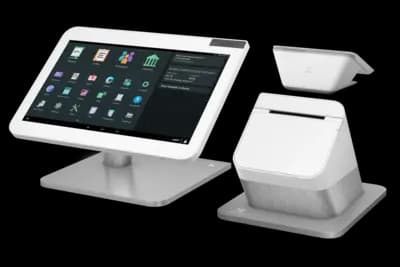
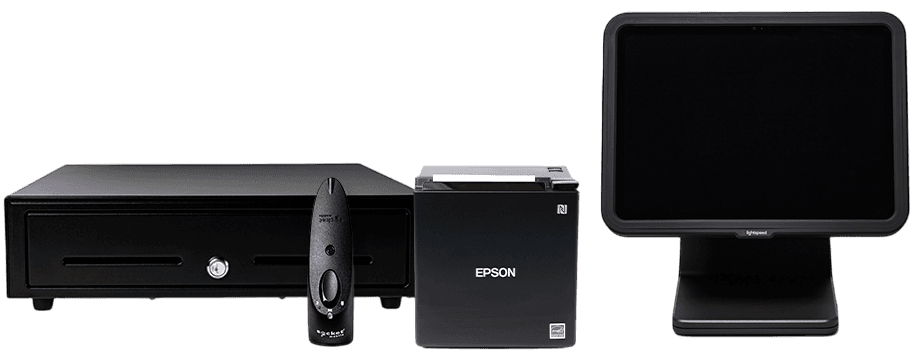
Both systems can be deployed affordably or expensively depending on register count and peripherals. The bigger difference is hardware “style”: Clover is purpose-built proprietary hardware, while Lightspeed is commonly iPad/desktop-based with retail peripherals.
Clover Hardware
Common liquor-store setups center around a main countertop station (often Station Duo / Mini), with add-on devices like Flex for line-busting.
Lightspeed Hardware
- Includes: POS stand, customer display, receipt printer
- Optional mobile scanning hardware: $300–$900
Payment Processing Costs
Processing is where the long-term economics can swing the most—especially once your card volume grows. The key issue is how much freedom you have to shop, negotiate, and control your effective rate over time.

Clover is owned by Fiserv, so you’re effectively in the Fiserv/First Data reseller ecosystem. Pricing depends heavily on the reseller/agent you sign with.
- Clover quotes often land between 2.19% and 3.25%+
- Our plan: Interchange + $49/month
Takeaway: Your processing cost is largely set by your Clover reseller.

Lightspeed tightly controls payment processing within its ecosystem, which simplifies setup but limits flexibility as your volume grows.
- Lightspeed Payments is required by default
- Typical effective rates fall in the ~2.6% - 3.5%+ range
- Using another processor costs up to ~$400/month extra
Takeaway: Lightspeed’s model is convenient, but it limits leverage to negotiate processing as volume grows.
Upload a recent merchant statement — we'll quantify your savings in dollars.
Overall takeaway: Clover is often cheaper on software upfront, but liquor-specific depth commonly requires paid apps, and processing fees depend heavily on the reseller. Lightspeed’s software tiers cost more, but you’re buying deeper inventory + reporting. Just model the payments structure carefully, since processor choice is limited unless you pay a monthly surcharge.
Calculate Your Total Cost of Ownership
📌 Note: This calculator does not include Clover's marketplace add-on app costs, which typically add $40–$150/month for essential liquor store functionality.
Quickly Compare Clover to Korona, BottlePOS, Lightspeed, and Square
Key Advantages for Liquor Stores: Clover vs Lightspeed
Clover and Lightspeed are both common in liquor retail, but they win for different reasons. Clover is popular for its hardware ecosystem, ease of deployment, and app marketplace flexibility. Lightspeed is built more like an enterprise retail platform with stronger analytics, deeper reporting, and more centralized controls for inventory-heavy operations.
Clover Advantages
- Fast setup with widely available hardware options (countertop + handheld)
- App marketplace can add features like loyalty, online ordering, and delivery integrations
- Simple day-to-day checkout experience for small teams
- Broad reseller availability (lots of hardware/installation support options)
- Good fit when you want flexibility through apps and don’t need enterprise-level reporting
Lightspeed Advantages
- Deep inventory structure with strong SKU-level reporting
- Advanced analytics for inventory-heavy, data-driven liquor retailers
- Robust multi-location reporting and centralized oversight
- iPad-based register flexibility with clean, modern retail UX
- Best fit when reporting/analytics matters more than processor flexibility
Summary: Clover is usually the better choice for smaller liquor stores that want fast deployment, flexible hardware, and the ability to add features through apps. Lightspeed is usually the better choice for inventory-heavy retailers who prioritize analytics, reporting depth, and centralized oversight, especially as SKU counts and locations grow.
How Clover and Lightspeed Compare for Liquor Stores
| Category |  |  |
|---|---|---|
| Inventory Depth (High-SKU Liquor) | Solid for small–mid stores (advanced tools require apps) | Enterprise-grade inventory built for high SKU counts |
| Case / Pack / Bottle Conversions | App-dependent for case-break logic | Native unit tracking with case-break support |
| Ordering, Vendors & Cost Tracking | Basic tools; deeper purchasing often requires apps | Vendor catalogs + purchase orders built-in |
| Age & ID Compliance Workflows | Age prompts + permissions (ID scanning via apps) | Age prompts + optional ID scanning (configuration required) |
| Reporting & Operational Control | Core reporting included; advanced insights require paid apps | Strong reporting and advanced analytics |
| Payment Processing Flexibility | Tied to Fiserv resellers (rates vary by provider) | Locked to Lightspeed Payments (3rd-party adds cost) |
| Pricing Transparency | Hardware + app pricing can vary by reseller | Premium pricing with quote-based add-ons |
| Typical Cost Trend Over Time | Can rise as apps and reseller margins stack | Often increases with add-ons and processing lock-in |
| Best Fit | Small to mid-size liquor stores prioritizing hardware flexibility and fast setup | Inventory-heavy or multi-location liquor retailers that prioritize analytics and reporting depth |


Takeaway: Lightspeed is a strong option for inventory-heavy or multi-location liquor retailers that prioritize enterprise-grade reporting and analytics, but it comes with higher costs, more setup complexity, and locked-in payment processing. Clover is typically the better fit for small to mid-size liquor stores that want faster deployment, flexible hardware, and a simpler day-to-day POS experience, especially when paired with transparent Interchange-plus pricing.
Clover vs Lightspeed: Reputation and User Reviews


Note: Ratings vary widely by reseller and configuration. Treat review scores as directional, and focus on patterns in what users praise or complain about.
Clover POS
LightSpeed
Final Verdict: Clover vs Lightspeed for Liquor Stores
Clover and Lightspeed are built for different types of liquor store owners. Clover is an app-driven ecosystem that shines for fast deployment, flexible hardware, and a simple day-to-day checkout flow. Lightspeed is a premium retail platform that leans into deeper inventory, purchasing, and analytics — but typically requires more setup and comes with more “platform-style” pricing decisions (including payment processing lock-in in many cases).
Many liquor store owners start with the easiest path to get running (hardware + checkout), then reassess as inventory complexity grows, reporting needs increase, and total cost (apps, add-ons, and processing terms) becomes more important.
Bottom line:
- If you want fast deployment, flexible hardware options, and you’re comfortable adding features through apps (with costs that can vary by reseller) → Clover is often the better “get running quickly” choice.
- If you want a more premium retail platform with stronger inventory depth and analytics (and you’re okay with more setup and a higher-cost ecosystem) → Lightspeed is typically the better fit as complexity grows.
Still Deciding Between Clover and Lightspeed?
Talk with our POS specialists — we’ll compare Clover, Lightspeed, and other liquor-store-ready systems based on your volume, growth plans, and processing preferences.
FAQs: Clover vs Lightspeed
Do Clover and Lightspeed work well for liquor stores?
Yes — both systems are used by liquor stores, but they’re designed around different priorities. Lightspeed is a premium retail platform known for deep inventory, purchasing, and analytics. Clover is an app-driven ecosystem that works well for liquor stores that want fast setup, flexible hardware, and a simpler day-to-day checkout experience.
Do I have to use a specific payment processor?
Lightspeed is typically tied to Lightspeed Payments. Using a third-party processor often results in additional monthly fees or higher total costs. Clover works through Fiserv resellers, which means pricing, terms, and processor flexibility can vary depending on the provider you choose.
Which system is cheaper for liquor stores?
Lightspeed often costs more over time due to premium software tiers, paid add-ons, and processing restrictions. Clover’s pricing varies by reseller, but many small to mid-size liquor stores find Clover more affordable initially — especially if they don’t need enterprise-level reporting.
Which POS is better for larger or more complex liquor stores?
Lightspeed is often the better choice for inventory-heavy, multi-location, or high-volume liquor stores that want advanced analytics and purchasing tools. Clover can support growth, but advanced inventory depth and reporting usually require paid apps as complexity increases.
Is Clover or Lightspeed better for small, single-location liquor stores?
Clover is often preferred by small liquor stores that want fast setup, affordable entry pricing, and flexible hardware options. Lightspeed can feel heavy for very small stores unless advanced inventory and analytics are truly needed.
Which POS is better if I want long-term flexibility?
If flexibility matters most, Clover offers more paths through its large reseller ecosystem, hardware options, and app marketplace. Lightspeed works best for liquor store owners who are comfortable committing to a more structured, platform-driven retail ecosystem.