
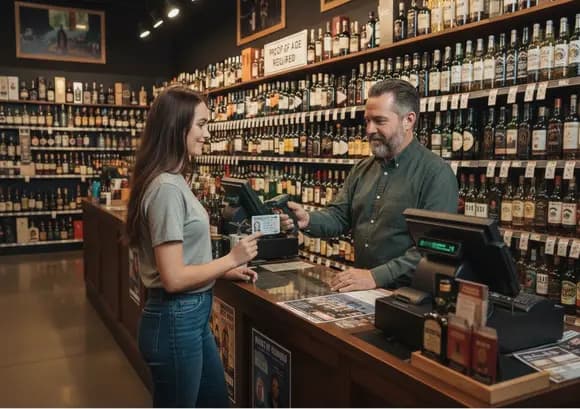
Age Verification Basics: What Makes Liquor Compliance Different
Age verification isn’t a single “Are they 21?” moment — it’s a workflow. The risk comes from how the POS prompts, how IDs are captured, who can override checks, and whether you can prove what happened later. When those controls are weak, compliance depends on memory, speed, and judgment at the counter.
POS Prompts
The POS should trigger age checks consistently for restricted items — not only when a cashier remembers. Strong prompts reduce missed checks during rushes.
ID Capture
Scanner vs manual entry changes accuracy. The goal is reliable age validation without slowing lines — and without turning compliance into “trust me.”
Overrides
Overrides are where most systems quietly fail. If anyone can bypass checks (or share a PIN), the prompt becomes a suggestion — not a control.
Audit Trails
If an incident happens, you need visibility: who rang it, whether an age check happened, and whether an override was used — without guessing.
A “Good” Age Verification Setup Has
- Restricted-item prompts that fire consistently at checkout
- Reliable ID capture using ID scanners
- Role-based overrides (manager-only, unique credentials)
- Audit visibility (who, when, what was overridden)
The Biggest Compliance Traps
- Prompts that can be skipped without accountability
- Shared manager PINs (no real chain of responsibility)
- Manual checks with no record (hard to reconstruct later)
- Inconsistent rules across terminals or locations
Quick diagnostic:
If your store’s age verification “process” is mostly training and reminders, the weak link is usually overrides + lack of audit visibility — not whether the POS shows a prompt. Tighten permissions, require unique credentials for bypasses, and make sure you can verify what happened after the fact.
Want to see which platforms handle liquor workflows cleanly as complexity grows? See our Best POS Systems for Liquor Stores guide and the platform reviews to compare how controls, permissions, and reporting differ.
POS Age Checks & ID Prompts
Age verification doesn’t fail because stores don’t care — it fails when POS systems treat age checks as optional prompts instead of enforced workflows. The difference comes down to when prompts fire, how IDs are handled, and who can bypass the check.
Some POS systems simply display a reminder to check ID. Others require an explicit confirmation or scanned validation before the sale can continue. That difference determines whether compliance is enforced — or quietly skipped during busy moments.
- Restricted-item triggers tied to alcohol categories
- Non-skippable prompts at the point of sale
- Scanner-based ID capture for consistency
- Logged confirmations tied to the cashier or manager
Quick diagnostic:
If your POS “checks ID” but you can’t later prove who confirmed it or how it was validated, the system is relying on memory — not controls. Strong age verification requires enforced prompts, scanner support, and audit visibility.
Scanner vs Manual Entry Verification
The POS can prompt for an age check — but how the ID is captured determines whether the process is consistent or handled on the fly. Manual entry sounds simple until you realize it introduces typos, rushed estimates, and inconsistent formats. Scanner-based capture is faster, more consistent, and far easier to audit when something goes wrong.
- Captures ID data the same way across cashiers and shifts
- Reduces “estimated” dates of birth and rushed assumptions
- Faster checkout with fewer judgment calls at the screen
- Cleaner audit trails when enforcement or incidents occur
- Typos and format mistakes are common (especially under pressure)
- Encourages “quick confirms” instead of real validation
- Inconsistent between cashiers (some enter DOB, some guess age)
- Harder to reconstruct what happened after the fact
If your team routinely says “we always check IDs,” but your POS history can’t consistently show how the age check was validated, you’re relying on manual behavior — and manual processes drift over time.
Not every POS supports scanner-based age verification equally. Liquor-focused platforms like Korona POS and BottlePOS are designed to enforce and log age checks as part of the checkout flow, while other systems may only display a prompt without reliable validation or audit history.
Permissions & Overrides
Age verification doesn’t usually fail at the prompt — it fails at the override. When permissions are too broad, shared, or poorly logged, age checks become suggestions instead of controls. MOST compliance issues trace back to who was allowed to bypass the check and whether that action was visible later.
If your store relies on “manager approval” but can’t reliably show which manager approved which sale, the override is effectively uncontrolled. Strong systems require unique credentials and log override actions per transaction.
Audit Logs & Transaction History
Audit logs are what matter after something goes wrong. When an age-restricted sale is questioned, intent doesn’t carry much weight — documentation does. The difference between “we always check IDs” and “here’s what happened” lives entirely in your POS logs.
If you can see that a sale happened but can’t confidently answer who approved it, how the age check occurred, or whether an override was used, your audit trail isn’t doing its job.
Strong audit logs don’t prevent mistakes — they make accountability possible. That’s why liquor-focused platforms like Korona POS emphasize transaction history, user attribution, and override visibility, rather than relying on verbal explanations after the fact.
Human Error & Staff Training
Most age-verification failures aren’t intentional — they happen when normal human behavior meets a weak process. Staff get rushed, distracted, or overly familiar with regular customers. Training helps, but without POS controls, compliance still depends on memory and judgment.
The best setups treat training as the baseline and use the POS to enforce consistency: prompts that can’t be ignored, scanner-based validation, locked-down overrides, and audit visibility when something needs review.
If your compliance strategy is mostly “training and reminders,” your weak point is usually inconsistent execution during rushes. Strong POS controls reduce human variability by forcing the same steps every time.
State Enforcement
Alcohol compliance varies by state, but enforcement is often triggered by the same repeat failures. States regularly use mystery shoppers and routine compliance checks that look like normal customers — often during busy periods.
Recommended POS Platforms
Age verification isn’t about having a prompt — it’s about whether the POS can enforce the workflow, restrict exceptions, and prove what happened later. These liquor-focused platforms come up most often when stores care about repeatable compliance.

- Enforced age prompts tied to restricted items (not just reminders)
- Scanner-first workflows to reduce manual entry mistakes
- Manager-only overrides with permissions and visibility into usage
- Audit-ready history (cashier identity, time, terminal, and approvals)

- Liquor-focused checkout flow with built-in restriction handling
- Age prompts can be implemented as part of the standard workflow
- Manager approvals and exception handling are central to compliance
- Works well when you want a unified liquor-first system end-to-end
They can work for basic checkout, but they’re not liquor-native. For age verification specifically, the gaps usually show up as weak enforcement (easy bypass), loose permissions (shared logins), or limited audit visibility when incidents are reviewed.
Free Analysis: Which POS Fits Your Workflow?
Not every liquor store needs the same POS — and most demos gloss over the tradeoffs. We’ll map your real workflow (staffing, overrides, enforcement strictness, and reporting expectations) to the systems that actually fit — including which options to avoid for compliance-heavy environments.
- Checkout speed vs enforcement strictness
- Staff size, turnover, training reality
- How often overrides happen
- Scanner-first ID workflows
- Manager-only exceptions
- Audit visibility into overrides
- A short list of best-fit platforms
- Clear tradeoffs between options
- What to validate in a demo
Just a straight recommendation based on how your store actually runs.
FAQs: Liquor Store POS Age Verification
Is an “age prompt” enough to stay compliant?
Not by itself. An age prompt only helps if the POS can enforce the workflow — meaning it reliably triggers on restricted items, limits bypassing, and records what happened. A reminder that can be ignored is not the same as a controlled process.
How should POS age checks and ID prompts work at checkout?
The best flow is triggered by restricted item flags and forces an ID checkpoint before the sale can complete. Ideally, the prompt is paired with staff identity (who processed it) and visibility into any manager approval if an exception occurs.
Why is manual ID entry riskier than scanning?
Manual entry introduces predictable failure points: rushed assumptions, typos, inconsistent formats, and “close enough” decisions during busy periods. Scanner-based capture is faster and more consistent, and it’s easier to defend later because the workflow is repeatable.
What should override permissions look like in a liquor store?
Overrides should be restricted to managers, tied to unique logins or PINs, and visible in reporting. If any cashier can bypass an age check — or if staff share credentials — the system becomes harder to control and harder to audit when something goes wrong.
What should an audit log capture for alcohol compliance?
At minimum: cashier identity, time, terminal, restricted item flags, whether an age check was confirmed, and whether an override happened (plus who approved it). The point isn’t paperwork — it’s having a clear record when questions come up later.
Can staff training replace POS-based compliance controls?
Training matters, but it doesn’t eliminate human error — especially with turnover, rush periods, and inconsistent enforcement. The strongest setups use the POS to create a repeatable checkout process, then use training to reinforce it. When compliance relies on memory alone, mistakes become much more likely.
Do enforcement priorities vary by state?
Yes — enforcement and penalties vary by state and sometimes by county or city. That said, the most common triggers are consistent: underage sales, selling to intoxicated patrons, operating outside permitted hours, and weak documentation when incidents are reviewed. This guide is educational and not legal advice.
Are all POS systems “good enough” for liquor compliance?
No. Some systems only show prompts, while others can enforce checkpoints, restrict overrides, and provide audit-grade history. If you run high volume or have multiple employees on the register, enforcement and visibility matter more than the prompt itself.
Which POS platforms are strongest for age verification workflows?
Liquor-focused platforms tend to do better when you need enforcement, permissions, and clear transaction history. See our full reviews of Korona POS and BottlePOS to compare how each approaches liquor workflows and control.
Can you help me choose the right POS for my store?
Yes. If you tell us how your store operates (volume, staffing, age-check strictness, and how often exceptions happen), we can recommend the best-fit platform and walk you through what to validate in a demo.